🍽️ Restaurant Billing Software

Restaurant Billing Software Made in Chennai

Touch4Bill is a cloud restaurant billing software built in Chennai. Take orders at the table or counter, send KOTs to the kitchen, print GST bills in one tap, and pull in Swiggy and Zomato orders, all from one screen. It runs on the PC, tablet or Android phone you already have.

Table, takeaway, delivery and online orders in one place
KOT to kitchen printer or kitchen display
5% restaurant GST with automatic CGST / SGST split
Keeps billing when the internet goes down
Get a Free Demo → See Pricing
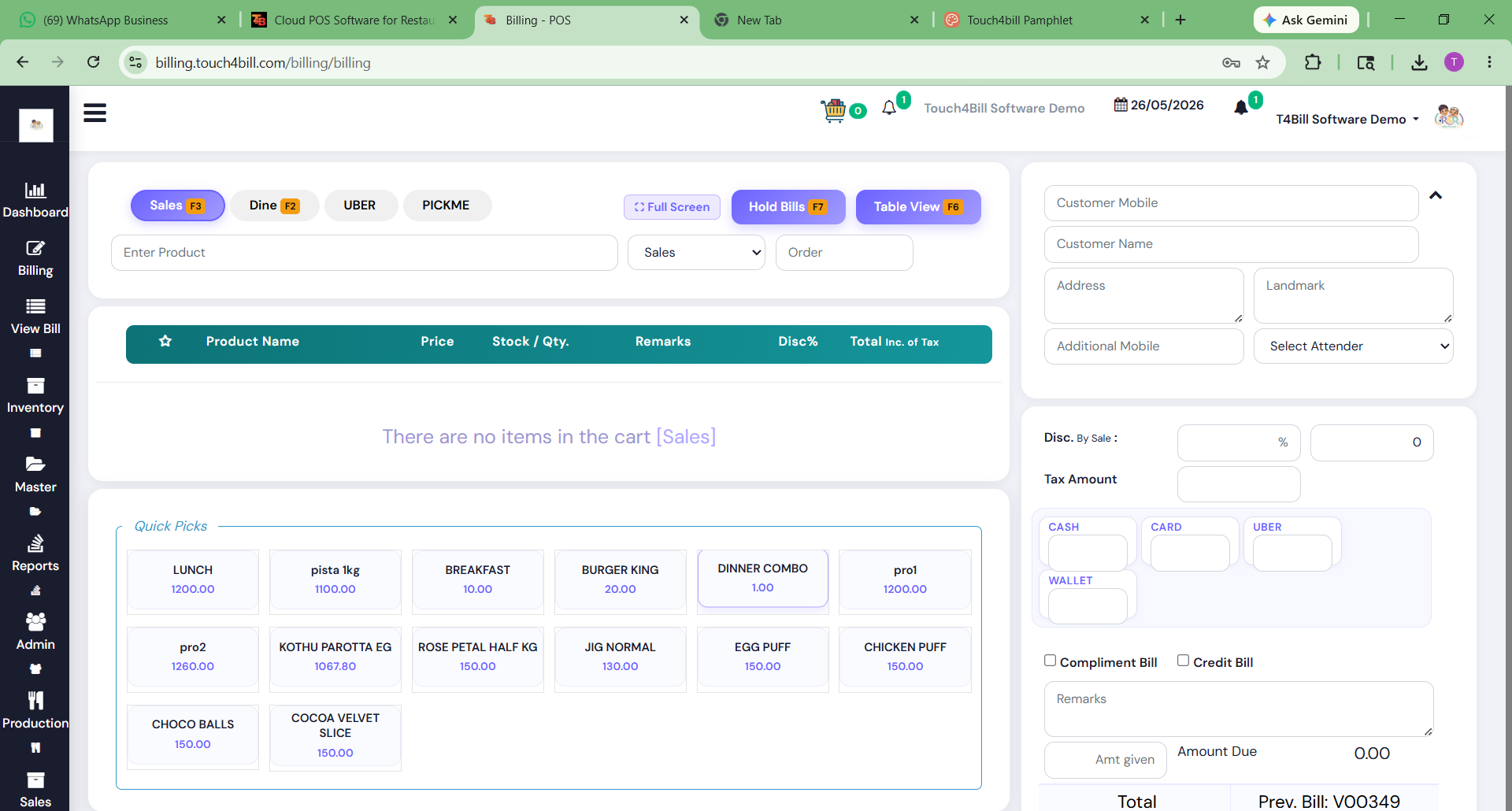
Touch4Bill restaurant billing screen showing menu items, table order and GST bill total
Restaurants Using Touch4Bill

Trusted by messes, biryani shops,
cafes and food courts

Pattukottai Mess
Pattukottai Mess
Paandikadai Madurai Mess
AM Biriyani
AM Biriyani
Biriyani Paradise
Biriyani Paradise
Only Coffee Pure Vegetarian Restaurant
Only Coffee
Althaf Food Court
Althaf Food Court
Al-Maas Indian Family Restaurant
Al-Maas Family Restaurant
Minz Foods
Minz Foods

See all 150+ clients →

Built for Your Format

One billing software,
every kind of restaurant

🍛
Messes & South Indian Restaurants

Meals, tiffin and parotta billed in seconds from a touch menu grid, with GST bills printed or sent on WhatsApp.

🍗
Biryani Shops

Fast counter billing for rush hours, dine-in, takeaway and online orders on one screen, and cash plus UPI on the same bill.

🍽️
Family & Fine Dine Restaurants

Visual table floor plan, order-taking at the table from a phone, split bills, and table merge or transfer.

☕
Cafes & Bakeries

Quick-service billing, WhatsApp bills instead of paper, and loyalty points to bring regulars back.

🏬
Food Courts

Several counters billing at once, KOTs routed to the right kitchen section, and combined sales reports.

🛵
Cloud Kitchens

Swiggy and Zomato orders land straight on the POS and kitchen screen, with no re-typing. How it works →

Features

Everything a restaurant
billing system needs

⚡
One-Tap Billing
Tap items from the menu grid or search by name to bill in seconds. Print on a thermal printer or send the bill on WhatsApp.
🍳
KOT System
Orders go to the kitchen printer or display the moment they are placed, routed by section. KOT system →
🪑
Table Management
See which tables are occupied, billed or free. Move, merge and split tables without losing the order.
🧾
GST Billing
GST bills with CGST/SGST split, HSN/SAC codes and GSTR-1 export. GST billing →
📱
QR Table Ordering
Guests scan, browse the menu and order from their phone. Orders reach the POS and kitchen directly. QR ordering →
🛵
Swiggy & Zomato Orders
Online orders flow into the same screen as dine-in, so nothing is missed or typed twice. Integration →
💬
WhatsApp Bills
Send the GST bill to the customer's WhatsApp instead of printing. WhatsApp billing →
📦
Recipe-Based Inventory
Ingredients are deducted per recipe on every sale, with low-stock alerts. Inventory →
📲
Mobile POS for Waiters
Waiters take orders, split bills and merge tables from an Android phone. Mobile POS →
🔌
Offline Mode
Bills are saved locally during internet or power outages and sync to the cloud when you are back online.
🏢
Multi-Branch Control
Central menu and price control with outlet-wise sales on one dashboard. Multi-branch →
📊
Owner Reports on Phone
Daily sales, item-wise sales, payment modes and staff reports, live from anywhere.
Buyer's Guide

How to choose the best restaurant billing software

There is no single "best" restaurant billing software for every business. A 10-table mess in Madurai and a 3-outlet cafe chain in Chennai need different things. Use this checklist to compare any billing software, including ours, before you buy.

1. Speed at the counter

During lunch rush, every extra tap costs you a customer. Ask for a live demo and time how long it takes to bill five common items. Look for a clear touch menu, quick item search and a simple payment screen.

2. KOT and table management

If you serve dine-in, the software must send KOTs to the kitchen automatically and show table status at a glance. Check that it supports multiple kitchen sections (for example, tandoor and juice counter) and add-on orders for the same table.

3. GST done correctly

Most standalone restaurants charge 5% GST without input tax credit. Your bills must show the CGST and SGST split, your GSTIN and the correct SAC code, and the software should export data for GSTR-1 and GSTR-3B. Read our GST tips for restaurants for the details.

4. Works when the internet doesn't

Internet and power cuts happen. Pure online-only billing stops your counter. Make sure bills are stored locally and synced later.

5. Online orders in the same system

If you sell on Swiggy and Zomato, re-typing every order into the POS causes mistakes and stock mismatches. Ask whether online orders flow straight into billing and the kitchen.

6. Inventory that matches your kitchen

Item-level stock is not enough for a restaurant. You need recipe-based deduction (for example, 200 g rice and 150 g chicken per biryani) to see real food cost and wastage. Try our free food cost calculator to see what this looks like.

7. Local setup and support

Menu upload, printer setup and staff training take time. A vendor that can set you up the same day and answer the phone during service hours is worth more than an extra feature you will never use.

8. Clear, honest pricing

Compare the full yearly cost: software, extra terminals, KOT, online-order integration and support. Watch for features that are listed on the website but charged as add-ons.

Want to see how the popular options compare? Read our guide to the best restaurant billing software in India.

Pricing

Restaurant billing software price

No setup charges. Cancel anytime. Yearly plans save 20%.

Starter
₹999 /month + GST

For takeaway counters, small cafes and bakeries with one billing terminal. Cloud billing, GST invoices and basic inventory.

Professional · Best for restaurants
₹1,999 /month + GST

For dine-in restaurants. Up to 3 terminals, KOT and table management, offline sync, CRM and loyalty, purchase and accounting.

Enterprise
Custom

For restaurant chains and food courts. Unlimited terminals and branches, custom integrations, a dedicated manager and on-site training.

Compare plans in detail →

Getting Started

Live at your restaurant
in a day

01
Free Demo

We show the software with a menu like yours, on a call or at your restaurant.

02
Menu Upload

Send us your menu card. Our team enters items, prices, GST rates and variants.

03
Printer & Staff Setup

We connect billing and KOT printers and create logins for cashiers and captains.

04
Start Billing

Your staff are trained and billing the same day. Support is a call or WhatsApp away.

FAQ

Restaurant billing software questions

Answers to what restaurant owners ask us most before switching.

Ask us anything →

Restaurant billing software (also called a restaurant POS) is used to take orders, print or send bills, collect payments and track sales. Good restaurant billing software also sends orders to the kitchen as KOTs, manages tables, handles GST and tracks ingredient stock.

The best choice depends on your format, budget and how much local support you need. Compare billing speed, KOT and table management, GST compliance, offline mode, Swiggy and Zomato integration, recipe-based inventory and total yearly cost. Touch4Bill is built for restaurants in Tamil Nadu, with same-day setup and local support from Chennai.

Touch4Bill starts at ₹999/month + GST for a single terminal. Most dine-in restaurants choose the Professional plan at ₹1,999/month + GST, which includes KOT, table management and offline sync. Yearly plans save 20%, and there are no setup charges. See pricing.

Yes. Orders are sent to a kitchen printer or kitchen display as soon as they are placed, and the table screen shows which tables are occupied, billed or free. KOT and table management are included in the Professional and Enterprise plans.

Yes. Every bill shows the CGST and SGST split, your GSTIN and the HSN/SAC codes, and you can export data for GSTR-1 and GSTR-3B. Most standalone restaurants charge 5% GST, and the software applies the rate you set for each item.

Yes. Bills are saved locally during internet or power outages and sync to the cloud automatically when the connection returns.

Yes. Touch4Bill runs in the browser on Windows PCs, Android phones and tablets, iPhones and Macs. Waiters can take orders at the table from a phone and the KOT goes straight to the kitchen.

Yes. Swiggy and Zomato orders appear on the POS and kitchen display alongside dine-in orders, so there is no re-typing and stock stays accurate. Learn more.

Most restaurants are billing the same day. Our team uploads your menu, sets up billing and KOT printers, creates staff logins and trains your team.

See it billing your menu.

Book a free demo and we'll set up a few of your dishes so you can see exactly how billing, KOT and reports work for your restaurant.

Get Free Demo → Call +91 99626 14094