From Purchase Order to GRN to Closing Stock — Touch4Bill gives you a single dashboard that tracks every item's journey. Know what you ordered, what arrived, what was issued, and what's left — in real time.
✓ Used by 100+ businesses in Tamil Nadu · ✓ Multi-branch support
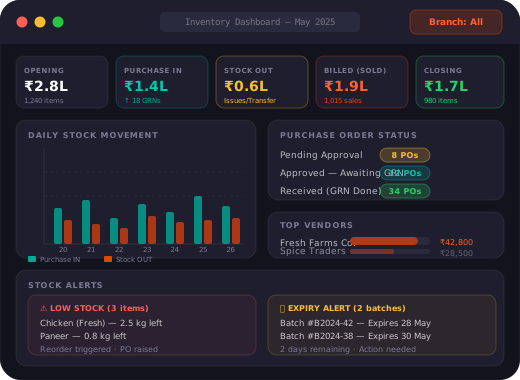
Every day, the inventory dashboard auto-calculates these five key metrics across all your products and branches.
Every purchase follows a structured workflow with approvals, so nothing gets ordered without authorisation and nothing gets received without a PO.
Department or kitchen raises an indent for required items with current stock and required quantity. Sent for manager approval.
Branch manager and HO approve the requisition. Approved quantity may differ from requested. Full audit trail with approver name and date.
PO is generated against the approved vendor with item, quantity, unit price and tax details. PO number auto-assigned for tracking.
When goods arrive, a GRN (Purchase IN) is recorded against the PO. Actual received quantity is entered. Stock auto-updates on save.
Stock IN reflects instantly on the dashboard. Closing stock recalculates. Vendor outstanding updates. Reports ready for download.
Most restaurants over-order by 15–20% because they don't know actual closing stock. With real-time stock visibility, you order only what you need — reducing wastage and blocking cash from sitting idle in inventory.
Without a PO workflow, kitchen staff or managers can purchase items without approval — inflating costs. The 2-level PO approval workflow ensures every purchase is authorised, documented and traceable.
Traditional stock takes take a full day every month. With Touch4Bill recording every IN and OUT automatically, your closing stock report is always accurate — just pick the date and download. No counting, no Excel.